

Does your Tuesday 6pm class make money?
Know which classes earn their place on your timetable.
Inside Pulse
See it in your day.
Know which classes earn their place on your timetable.
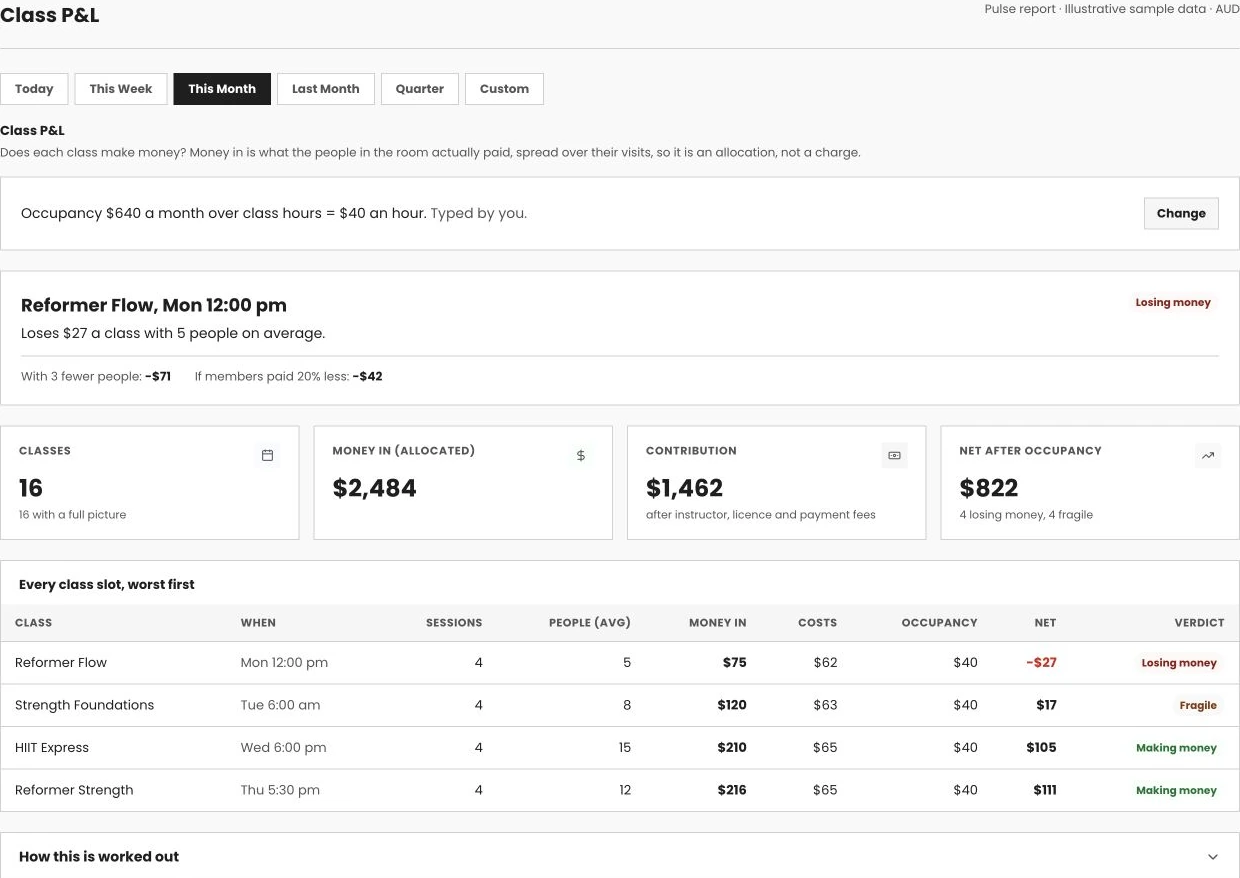
See which classes make money.
See what each class nets after staff, fees and its share of the rent.
See class profitability
 Swipe to explore · tap to enlarge
- 01Include your real costs
- 02See the weaker slots
- 03Decide what to change
Your business, in view.
Membership, check-ins and plan mix. See the patterns behind the day-to-day.
Explore reports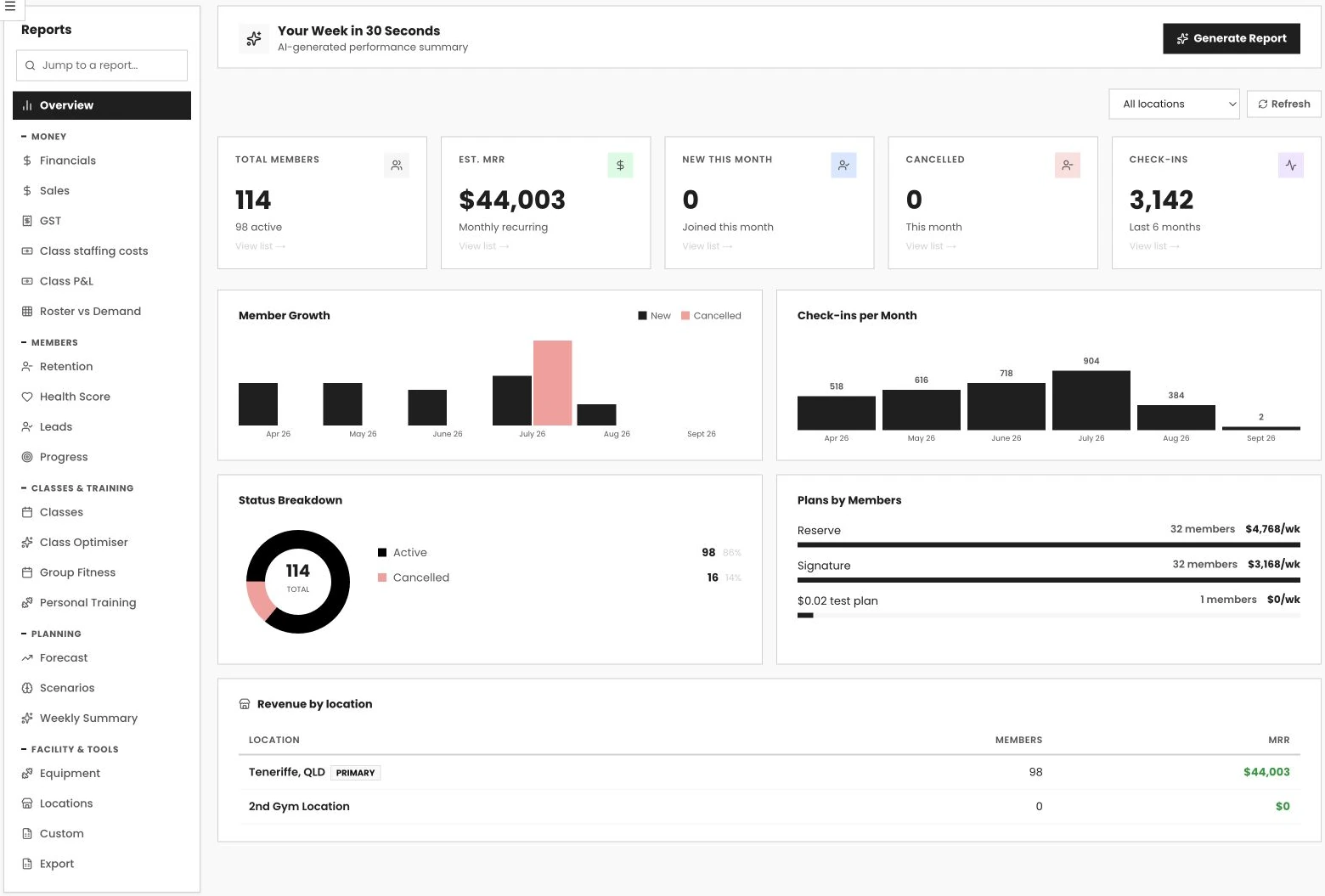 Swipe to explore · tap to enlarge
- 01See the big picture
- 02Explore the trends
- 03Plan your next move
How class p&l works in Pulse
Most gym owners can tell you how full a class is. Almost none can tell you what it nets after the instructor, the licence fee, the payment fees and its share of the rent. Class P&L works that out for every slot on your timetable, worst first, so the next decision about your schedule, your pricing or your lease is made on a number, not a feeling.
A full-looking timetable can still lose money, one class at a time.
Your software counts bookings. Your accountant counts the month. Nobody counts the class. So the slot that quietly loses $20 every time it runs keeps running, the intro offer that was meant to end in March is still pulling the seat price down, and the answer to a soft month is another $4,000 of ads for a timetable that was never built to pay.
You know how full it is, not what it earns
A fill rate is a count of bodies. It says nothing about what those bodies paid, what the instructor cost, or what the room cost for that hour.
Discounts that never ended
List price says $16 a seat. The intro offers, the mates rates and the aggregator payouts mean the room is earning $12. You feel it as a demand problem. It is a pricing problem.
Rent that never gets shared out
Your lease does not care whether the class is full. Until the occupancy cost sits on every class hour, a class can look profitable and still be paying you to teach it.
It is not a marketing problem. It is a maths problem.
A fractional CFO for fitness brands put it that way in Athletech News this month. If one class does not make money, running more of them does not fix it. It scales the loss.
Four numbers for every class. One decision at a time.
Money in, costs, a share of the rent, and what is left. For every slot, every week, with the two stress tests that tell you how safe it is.
Money in, allocated fairly
Each attendee's paid invoices over the last 90 days, spread over the days they visited, summed for the people in the room. What a seat really earned, not the list price.
Costs, all of them
The instructor at their real pay rate, the licence fee, payment fees at the published card split, and your occupancy cost spread over class hours or opening hours. Nothing typed twice.
Net, and how fragile it is
Every slot shows what it nets with three fewer people and with a 20% lower seat price. A class that only works when it is full gets called fragile before a thin night proves it.
We fit out gyms for a living. We have watched the maths go wrong.
We have seen good operators pour ad money into a timetable that was never built to pay, hold a discount long past the day it made sense, and sign a second lease on a gut feel about the first. Not because they were careless. Because nothing they owned put the cost of one class next to what it earned.
Class P&L is built into the system that already has your bookings, your attendance, your pay rates and your invoices. It does not ask anyone to keep a spreadsheet alive. It reads what Pulse already knows and puts one honest number on every slot.
VERVE Pulse is the software arm of VERVE Fitness, the commercial gym equipment company. Why Pulse →
Three steps. Then it runs every week without you.
One number to type. Everything else comes from data Pulse already holds.
Tell Pulse what the space costs
Type your monthly occupancy cost: rent, outgoings, utilities. Choose whether to spread it over class hours only, for a studio, or over your opening hours, for a gym with an open floor. If Xero is connected, Pulse offers last month's non-wage expenses as the starting figure.
Pulse prices every seat
Who was in the room comes from the headcount your staff recorded or the booked list. What each of them paid comes from their invoices, spread over their visits. The instructor's rate, the licence fee and the payment fees are already in Pulse.
Decide, slot by slot
Every slot lands in one table, worst first, with a plain verdict. The headline card names the class that most needs a decision: cut it, move it, fix the price, or take the rent per hour into the lease renewal.
Payback per member sits underneath. Type what you spent on marketing each month and Pulse shows what each new member cost, what they return a month, and how quickly they pay it back.
Your ordinary Tuesday 6pm. Not the Saturday that sells out.
Type your best guesses and see what one class nets after rent. Pulse does this from your real bookings, payments and pay rates. This is the ten-minute version.
If seats earned 20% less: $0.00
An estimate from what you typed. Payment fees use the published card split of Stripe 1.65% plus the Pulse platform fee of 0.8%. Inside Pulse the same maths runs on your real numbers for every slot, every week.
Two ways to run the same timetable.
| Counting bookings | Counting the class | |
|---|---|---|
| The soft month | Another campaign, another agency | The three slots losing money, named, before you spend a dollar on ads |
| The intro offer | Never sunsets, because nobody sees the seat price slide | What a seat really earns, next to what the class costs to run |
| The quiet class | Runs because it always has | Net per class, worst first, with a plain verdict |
| The lease renewal | A gut feel about whether you can afford it | Rent per class hour, in hand, for the conversation |
| New members | More leads at any price | What it cost to win one, against what they return and how long they stay |
Class P&L is included on every plan.
Every gym on Pulse gets the class maths. Payback per member, the marketing-spend view, comes with Grow and Pro.
Class P&L
Core, Grow and Pro- ✓ Allocated money in for every class, from real payments and visits
- ✓ Instructor cost, licence fee and payment fees per class
- ✓ Occupancy cost spread over class hours or opening hours, typed or from Xero
- ✓ Contribution, net and the two fragility lines per slot, worst first
- ✓ A headline card for the class that most needs a decision, and a net line on every class in Schedule
Payback per member
Grow and Pro- ✓ Type your marketing spend by month
- ✓ Cost to win each new member
- ✓ What a member returns each month after payment fees
- ✓ How long members stay, from your own history
- ✓ Payback time and lifetime return, in one plain sentence
Plan details and pricing are on the pricing page. See full pricing →
Why this belongs inside your gym software, not in a spreadsheet.
A spreadsheet has to be told who came, what they paid and what the instructor cost. Pulse already knows. It has the bookings, the recorded headcounts, the invoices and the pay rates, so the class maths runs on a busy Tuesday, not just in the week you had time to build the model.
It is also honest about what it is. Money in for a class is an allocation of what the people in the room actually paid, spread over their visits, never a made-up class fee. A member who pays and never visits contributes nothing to any class, and a class earns nothing from a seat filled by someone whose payout you have not set. When a number is missing, the class says so: no pay rate, no rent set, people we could not value. It never guesses a figure to fill the gap.
And it turns the argument about marketing into a decision about the timetable. When the three emptiest slots are named and priced, cutting them and moving that demand into fuller classes is a choice you can make on Monday. When the seat price sits next to the list price, ending the intro offer is a choice too. When the rent per class hour is in your hand, so is the renewal conversation.
Frequently asked questions.
What is Class P&L in VERVE Pulse?
A profit and loss for every class slot on your timetable: what the people in the room actually paid, spread over their visits, less the instructor, the licence fee, payment fees and a share of your rent, giving contribution and net per class. Slots sort worst first, and each shows what it would net with three fewer people or a 20% lower seat price, so you can see how fragile it is before a thin night proves it.
How does Pulse know what a class earned when members pay a membership, not a class fee?
It allocates. Each attendee's paid invoices over the last 90 days are divided by the days they visited, which gives what one visit carried for that member. A class's money in is the sum of those figures for the people who attended. Pulse calls it allocated money in, never a charge, because the membership pays for the whole gym and the class is one of the places a member spends it.
What if we don't use Xero?
Type your monthly occupancy cost once: rent, outgoings and utilities. Choose whether to spread it over class hours only, which suits a studio, or over your opening hours, which suits a gym with an open floor as well as classes. If Xero is connected, Pulse offers your last complete month of non-wage expenses as the starting figure.
How does it know who was in the room?
The headcount your staff recorded for the class, or the booked list when nobody recorded one. Members on a plan paid per visit by an aggregator such as Fitness Passport or ClassPass are valued at the per-visit payout you set on that plan.
Which plan is Class P&L on?
Every plan: Core, Grow and Pro. Payback per member, the view that puts your marketing spend against what a new member returns each month and how long members stay, is on Grow and Pro.
Is there a free trial?
Yes. VERVE Pulse has a 30-day free trial with every Pro plan feature. You add a card to start, and nothing is charged until the 30 days are up; cancel before then and you pay nothing. After the trial you are billed for the plan you chose. Start your free trial, or book a demo and we'll run a timetable through Class P&L on sample data, from the occupancy cost to the worst slot, so you can see how it would read for your gym.